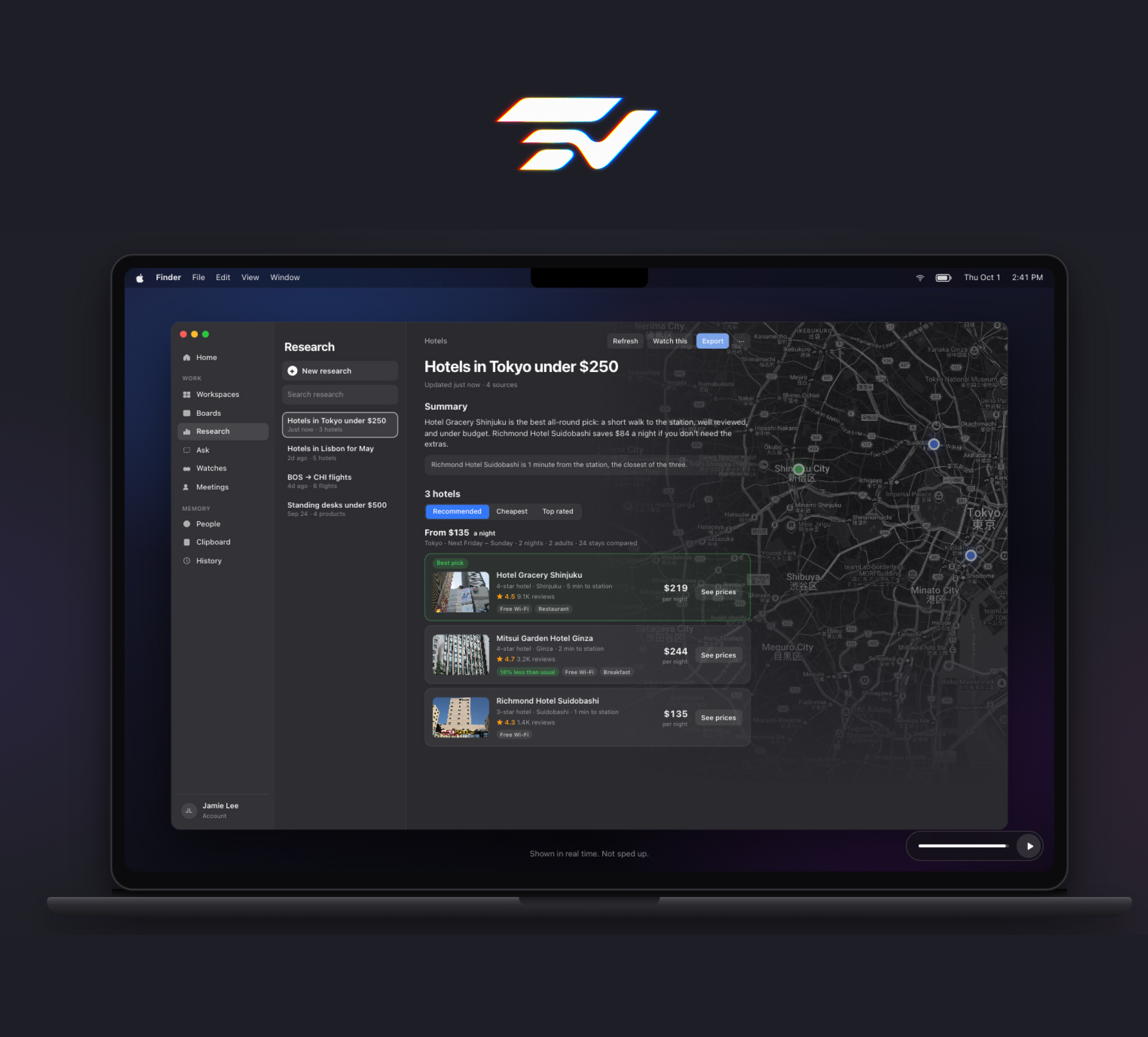
Beckon is a voice assistant for the Mac that lives in the MacBook notch. You say "Hey Beckon," press ⌘⌥J, or point at the notch, and it does the thing: opens a project, arranges your windows, converts a file, answers a Claude Code prompt. Ask for something bigger, like the best hotels in Tokyo under $250 a night, and it comes back with a ranked answer, real prices and links in about 16 seconds. The everyday tools are free forever and run on your Mac. The AI that does the research is Beckon Pro. Download it at beckonapp.ai or see the product page.
I didn't build Beckon to have a product to sell. I built it because I needed every feature in it, and I use it every day.
Why I built Beckon
Most of what slows me down on a Mac isn't hard work. It's small detours: opening the same five apps for a project, dragging windows into place, hunting for a file I saw an hour ago, uploading a photo to a converter site, checking which terminal is waiting on me. Each one takes a few seconds and a little attention, and they add up across a day.
The bigger detours were research. Finding the cheapest flight or a decent hotel meant a dozen tabs and half an hour of comparing. AI research tools helped, but they made me wait two to five minutes for an answer, which is long enough to lose the thread of whatever I was doing.
I wanted one thing I could ask out loud, from any app, that would handle both: the small detours instantly, and the research fast enough that I'd actually wait for it. Nothing I tried did that, so I built it. Then I kept using it, and the parts I reached for most shaped what Beckon became.
What Beckon does
Beckon splits into two halves, and the split is deliberate.
Free, forever, and on your Mac:
- Voice commands. Say "Hey Beckon," press ⌘⌥J, click the floating circle, or bind your own trigger. Several things in one sentence work too: "open Chrome, search YouTube, play the first one."
- Windows and workspaces. "Move this to the left half." "Spread my windows." Say "open design" and a project's apps, sites and folders open together.
- The island. Point at the notch for now playing, today's calendar, recent files, clipboard history and system stats.
- File conversion. HEIC to JPG, MOV to MP4, done on the Mac with no upload sites and no watermarks.
- "Where was I?" Brings back the apps, tabs and docs from an earlier session, up to 30 days back.
- Claude Code in the notch. When a session wants to run a command or asks a question, the notch shows it wherever you are. Usage limits, GitHub checks and Vercel deploys sit beside it.
Pro, the AI that does the work:
- Research. Hotels, flights, products, jobs or an open question, answered with a ranked recommendation, real prices and links. Hotels come back in about 16 seconds; flights across several sites in under a minute.
- Cheapest flights. Checks airlines' own websites, nearby airports and mixed-airline trips, and tells you when the lowest fare means two separate tickets.
- Ask about this. Press ⌃⌥⌘A, draw a box around a formula, chart, code error or foreign-language paragraph, and a plain-English answer streams in beside it.
- Watches. "Tell me when the Sony XM5 drops below $300." Beckon checks up to once a day and tells you what changed.
- Meeting notes. Zoom, Meet, Teams, FaceTime and Slack calls are transcribed on the Mac, with a summary and to-do list when the call ends.
How I use Beckon every day
The free half is what I touch constantly. Workspaces start my day: one word and a project's apps and tabs are where they belong. Window commands keep the screen tidy without me reaching for a shortcut I've forgotten. File conversion replaced every converter site I used to bookmark. When I come back to a project after a few days, "Where was I?" puts me back where I left off.
As someone who builds software, Claude Code in the notch is the feature I'd miss most. I run several sessions at once, and the notch tells me which one needs me and lets me answer it without hunting for the right terminal.
The Pro half is what I reach for when a task would otherwise eat an afternoon. Research is the one I use most: I ask out loud, keep working, and a ranked answer is waiting when I look back. Ask about this has become my default way of understanding anything on screen I don't recognize.
Designed to stay out of the way
An assistant that lives on your screen all day has to earn that spot. These principles guided every screen in Beckon.
The notch is the interface
The MacBook notch is the one piece of screen nobody uses. Beckon turns it into an island that grows out of the hardware: it's always in the same place, it never covers your work, and it disappears when you don't need it. Results, prompts and alerts all appear there, so you always know where to look.
Voice first, never voice only
Talking is the fastest way to say what you want, but it isn't always the right way. Every voice feature has a keyboard or click equivalent, and some things deliberately aren't voice-driven. Answering a Claude Code permission prompt out loud in the middle of other work turned out to be a worse interruption than one click, so it's a click.
Fast enough to wait for
Speed is a usability feature. A two-minute answer means you switch tasks and lose your place; a 16-second answer means you don't. Beckon's research is built to return in seconds, and the product page shows it running in real time, not sped up.
Safe by design
Research can look, but it never logs in, buys, submits or sends anything. It runs in its own background window, so your tabs stay exactly as they were, and Esc stops it at any time. Anything Beckon can't undo, like closing apps or sending a draft, waits for your confirmation. Beckon never guesses: when it isn't sure what you meant, it asks.
Private by default
The wake word, speech recognition and Beckon's own voice run on your Mac, and your voice is never saved. Meeting audio is transcribed on the Mac and never kept. Research and answers send only what each request needs, through a server that doesn't store the content. Activity history stays on your Mac for 30 days, banking and health sites are never recorded, and "forget the last hour" erases recent history.
The goals for Beckon
- Make the everyday instant, and keep it free. The things you do a hundred times a day shouldn't cost a subscription. They run on your Mac, so they don't.
- Return answers, not tabs. Research should end with a recommendation you can act on, with prices and links, not a pile of pages to read.
- Be fast enough to stay in flow. Seconds, not minutes, for every answer that matters.
- Never act behind your back. Read, compare, and suggest freely; anything irreversible waits for you.
- Grow from real use. Beckon's features came from my own days. New ones will come the same way, from what I and the people using it actually reach for.
Frequently asked questions
What is Beckon?
Beckon is a voice assistant for the Mac that lives in the MacBook notch. Everyday voice control, windows and workspaces, the notch island, file conversion and Claude Code in the notch are free. Beckon Pro adds research with real prices and links, cheapest flights, Ask about this, watches and meeting notes.
Who is Beckon for?
Anyone who spends the day on a Mac and wants fewer small detours: switching projects, arranging windows, finding files, converting media. Pro is for people who research flights, hotels, products or jobs often enough that minutes of comparing add up. Developers who run Claude Code get a notch that tells them which session needs them.
How fast is Beckon's research?
Hotel research returns a ranked answer with real prices and links in about 16 seconds. Flight research across several sites takes under a minute. Typical AI research agents take two to five minutes.
What does Beckon need to run?
A Mac with Apple silicon (M1 or later) running macOS 14 Sonoma or later. Intel Macs aren't supported because Beckon's voice runs on the Apple silicon Neural Engine.
How much does Beckon cost?
Free is $0 forever. Pro is $14.99 a month or $119 a year. Max is $29.99 a month or $249 a year. Every download starts with 14 days of Pro, and no card is needed.
Beckon is free to download for Apple silicon Macs, and every download includes 14 days of Pro. Get it at beckonapp.ai.